
Claude Code Skills vs MCP Servers: What's the Difference in 2026?
Compare Claude Code skills and Model Context Protocol (MCP) servers. Learn key architectural differences, token costs, real-world examples, and when to use each.
AicodePro Team
VERIFIED AUTHOR
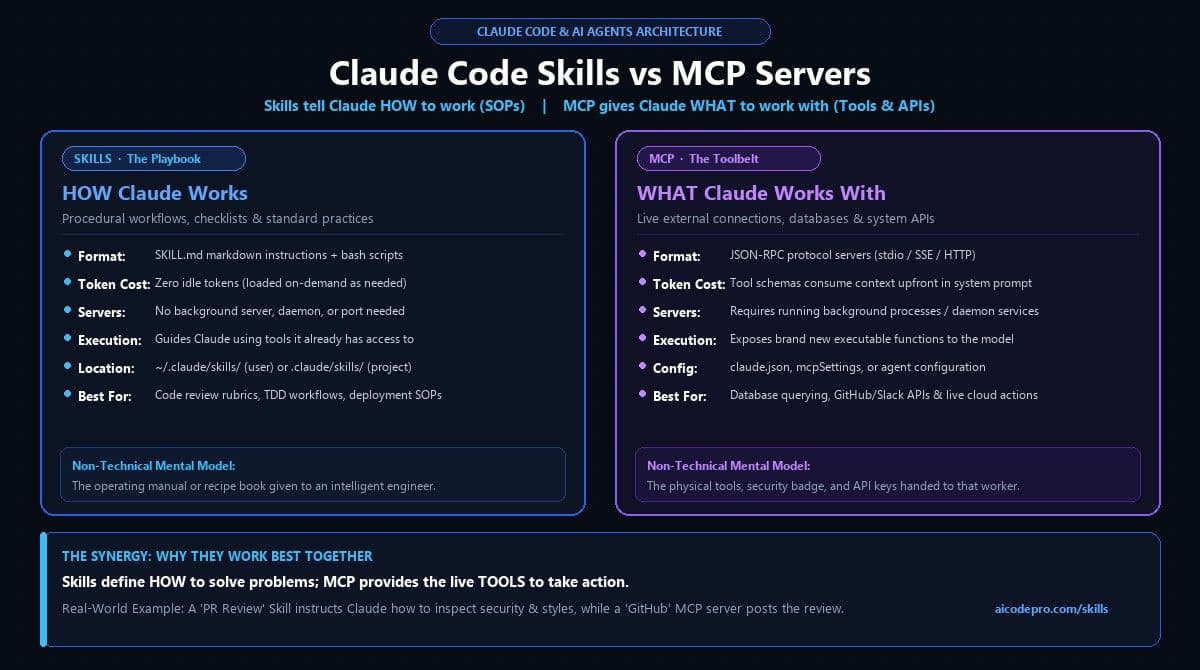
Quick Answer: When evaluating claude code skills vs mcp, the core distinction is simple: Claude Code skills are lightweight markdown instructions (SKILL.md) that teach AI agents how to execute procedures and workflows. Model Context Protocol (MCP) servers are software bridges running over JSON-RPC that give AI agents what to work with (external databases, APIs, and tools). In short: Skills are the playbook; MCP is the toolbelt.
- Mental Model: Skills teach procedures (SOPs, rubrics, coding standards). MCP servers expose executable connections (GitHub, Postgres, Slack, Jira).
- Token Efficiency: Skills use two-tier progressive disclosure (~20 tokens idle cost). MCP servers preload complete tool schemas into the system prompt upfront (~1,000–5,000 tokens).
- Zero Infrastructure: Skills live in plain markdown files (
.claude/skills/) with no servers, daemons, or ports required. MCP requires active background server processes. - The Synergy Pattern: Leading engineering teams combine both: a skill guides the step-by-step logic, while an MCP tool executes the actual external action.
- Security Boundaries: Skills govern agent reasoning and file inspection; MCP servers require strict connection credentials and database permission scoping.
Claude Code Skills vs MCP Servers at a Glance
To help engineering and product teams choose the right architectural approach, here is an at-a-glance technical comparison between Claude Code skills and Model Context Protocol servers:
| Dimension | Claude Code Skill | MCP Server | Hybrid Synergy (Both) |
|---|---|---|---|
| Main Purpose | Teach Claude a procedure, workflow, or SOP | Connect Claude to external tools, databases, and APIs | Enforces workflow discipline while executing live actions |
| Typical Format | SKILL.md markdown file + optional bash/scripts | Running JSON-RPC server (Node, Python, Go via stdio/SSE) | Skill references MCP tool names inside its instructions |
| Infrastructure Needed | Zero (plain local filesystem directory) | Yes (local background process or remote container) | Runs local daemon with local folder orchestration |
| Token Consumption | 0 idle tokens; ~20 tokens in index; loads on demand | Upfront schema cost (500 to 5,000+ tokens per session) | Minimizes prompt bloat by orchestrating selective calls |
| Execution Capability | Uses tools Claude already has (read/write/bash) | Exposes brand new executable functions and endpoints | End-to-end autonomous agent workflow execution |
| Where It Lives | ~/.claude/skills/ (personal) or .claude/skills/ (repo) | Configured in claude.json or MCP configuration files | Unified repo settings for engineering teams |
| Offline Support | 100% offline capable | Depends on whether the external service is local or remote | Local fallback when offline |
| Best Used For | PR review checklists, TDD loops, coding rubrics, SEO SOPs | Postgres querying, Slack notifications, GitHub API actions | Complete autonomous agentic pair programming |
What is a Claude Code Skill?
A Claude Code skill is a modular directory containing a SKILL.md markdown document and optional supporting bash scripts, schemas, or reference files. Skills teach Claude Code domain-specific workflows, organizational standards, and operational playbooks.
Rather than relying on vague, one-off prompts, a skill encapsulates repeatable procedures. Anthropic architected skills using a technique called progressive disclosure:
- Tier 1 (Indexing): When Claude Code boots, it scans your skills directories and loads only the skill name and frontmatter description into memory. This lightweight catalog consumes fewer than 30 tokens per skill.
- Tier 2 (Activation): When your natural language prompt matches a skill's description (or when you invoke it via slash command), Claude automatically loads the full
SKILL.mdinstructions into the active context window.
Skills operate within two distinct scopes:
- Personal Global Scope (
~/.claude/skills/): Installed on your machine and accessible across all your personal repositories and coding projects. - Team Project Scope (
.claude/skills/): Checked into your repository's Git tracking. Every teammate and CI/CD agent that clones the repo instantly gains the same uniform skills.
Looking to explore verified, production-ready skills? Browse the AiCodePro AI Skills Directory for hundreds of curated skills covering engineering, SEO, and pipeline automation.
What is an MCP Server?
The Model Context Protocol (MCP) is an open protocol standard introduced by Anthropic that standardizes how AI applications connect to external tools, databases, and enterprise data sources. An MCP server is a standalone program running as a local background process (via stdio) or a remote web service (via SSE or HTTP).
MCP servers expose three fundamental capabilities to Claude:
- Tools: Executable functions that Claude can invoke (for example,
execute_sql_query,create_github_issue, orsend_slack_message). - Resources: Passive contextual data that Claude can inspect (such as file schemas, database table definitions, or server logs).
- Prompts: Pre-packaged prompt templates provided by the server to guide specific tool sequences.
Because MCP servers communicate over JSON-RPC, they can be authored in any programming language (Node.js, Python, Go, Rust) and can interact directly with private infrastructure behind your corporate firewall.
Real-World Example 1: Automated Pull Request Review
To understand the difference in practice, consider how an AI agent reviews an incoming pull request on GitHub:
The Role of the Claude Code Skill
The code-review skill contains a strict, step-by-step review rubric:
---
name: code-review
description: Comprehensive PR code review checking for OWASP vulnerabilities, TypeScript type safety, and test coverage.
---
# PR Review Instructions
1. Check changed files for SQL injection or unescaped user inputs.
2. Verify all React components implement proper memoization where appropriate.
3. Ensure unit test coverage matches or exceeds 85% on new code paths.
4. Format output with explicit severity ratings: [BLOCKER], [WARNING], or [NIT].
Notice: The skill dictates how to think, what rubrics to evaluate, and how to structure the feedback. It contains zero server code.
The Role of the GitHub MCP Server
The github-mcp-server runs in the background and provides Claude with the actual API connections:
- Tool:
github.get_pull_request_diff(repo, pr_number) - Tool:
github.list_commits(repo, pr_number) - Tool:
github.post_inline_review_comment(repo, pr_number, file, line, comment)
Notice: The MCP server provides the physical tools and permissions to fetch data and write to GitHub. It does not dictate what constitutes good code quality.
The Combined Synergy
When used together, Claude loads the Code Review Skill to understand company standards, calls the GitHub MCP Server to fetch the diff, evaluates the code against the skill's rubric, and uses the MCP tool to post precise, structured feedback. The skill provides the brain; MCP provides the hands.
Real-World Example 2: Querying Production Databases
Consider querying a database for customer retention statistics:
- The Postgres MCP Server: Connects to your PostgreSQL instance, exposes
db_execute_query, and manages SSL pooling and connection lifecycles. - The Database Safety Skill: Instructs Claude never to execute
DROP,DELETE, orALTERstatements, enforces aLIMIT 100clause on every query, masks PII (email, phone numbers), and formats results into clean markdown summaries.
Without the skill, an unrestricted MCP server risks accidental data loss or privacy leakage. Without the MCP server, the skill has no way to access the live database.
Token Cost, Latency & Context Window Efficiency
One of the most critical architectural differences between skills and MCP servers is how they consume context window tokens:
Claude Code Skills: Progressive Disclosure
Skills add virtually zero overhead to your day-to-day sessions. Only the metadata name and description are indexed (~20 tokens per skill). You can have 50 skills installed, and your context window will remain lean. Full body instructions load only when activated.
MCP Servers: Upfront Schema Overhead
Each connected MCP server preloads all its JSON Schema tool signatures directly into the system prompt. Connecting 5 complex MCP servers can permanently consume 2,000 to 8,000 tokens on every single turn, reducing effective context space for your code and documentation.
When to Use a Claude Code Skill
Build or install a Claude Code skill when your goal is to standardize behavior and workflows:
- You want zero infrastructure: You need an agent capability that works immediately without running background daemons or Docker containers.
- You need to enforce coding procedures: Test-Driven Development (TDD) cycles, git commit standards, migration checklists, or SEO metadata rubrics.
- You want project-level team sharing: You want to commit
.claude/skills/into your Git repo so every developer on the team automatically benefits. - You need multi-step orchestration: Guiding Claude through complex phases (Research → Plan → Implement → Test → Verify).
For a step-by-step walkthrough on setting up skills, read our complete Claude Code Skills Installation Guide.
When to Use an MCP Server
Build or configure an MCP server when Claude needs to touch live systems outside its default environment:
- Connecting to external services: GitHub, GitLab, Jira, Slack, Notion, or Linear.
- Querying data stores: PostgreSQL, MySQL, Redis, MongoDB, Snowflake, or Elasticsearch.
- Running isolated execution sandboxes: Cloud execution environments, browser automation engines (Puppeteer/Playwright), or secure hardware peripherals.
- Exposing proprietary APIs: Integrating internal microservices and corporate authentication layers.
The Complete Agent Stack: Skills, MCP, Subagents & Hooks
In modern enterprise agentic systems (such as the AiCodePro Autonomous Platform), skills and MCP servers form two pillars of a four-layer architecture:
- Skills (How to work): Markdown SOPs and procedural checklists that direct the agent's problem-solving strategy.
- MCP Servers (What to work with): Protocol-level tools that execute actions on external databases, APIs, and microservices.
- Subagents (Who does the work): Independent agent instances spawned with isolated contexts to perform parallel research, review, or testing.
- Hooks & Host Policy (Safety guardrails): Deterministic programmatic rules that validate tool calls, enforce quality gates, and prevent unauthorized writes.
Frequently Asked Questions
What is the core difference between Claude Code skills and MCP servers?
Claude Code skills are lightweight markdown instructions (SKILL.md) that teach Claude how to execute a specific procedure or workflow. MCP servers are software bridges using JSON-RPC that connect Claude to external tools, databases, and APIs. Skills define how to work; MCP provides what to work with.
Can a Claude Code skill call an MCP tool?
Yes. Skills and MCP servers are designed to work together synergistically. A skill provides the procedural playbook and instructions, guiding Claude on when and how to call external tools provided by an active MCP server (such as querying a PostgreSQL database or posting a GitHub comment).
Do Claude Code skills consume context tokens when not in use?
No. Claude Code skills use progressive disclosure. Only lightweight metadata (name and description, ~20-30 tokens per skill) is kept in the initial prompt index. Full skill instructions are loaded into the context window only when triggered by relevant user requests. In contrast, MCP servers load full tool schemas into the system prompt upfront.
Do Claude Code skills work outside the Claude Code CLI?
Claude Code skills follow an open markdown specification (SKILL.md) pioneered by Anthropic. While natively parsed and managed by the Claude Code CLI agent runtime, other agent frameworks and IDE extensions can parse and adopt the same SKILL.md format to provide procedural capabilities.
Can I use Claude Code skills completely offline?
Yes. Because Claude Code skills reside entirely in local markdown files on your filesystem (~/.claude/skills/ or .claude/skills/), they require zero network connections or external daemons to load. If the skill uses local bash scripts or git commands, it executes entirely on your machine.
Where can I find pre-built, verified Claude Code skills?
You can discover, test, and install over 300+ pre-verified agent skills across engineering, SEO, code review, and sales automation in the AiCodePro AI Skills Directory.
Supercharge Your AI Coding Agent
Ready to equip your developer agents with battle-tested skills? Explore our directory of 300+ verified skills or learn how to install them in under two minutes.
Sources & References
Share with AI
Summarize this article, answer my questions based on it, and help me understand the key insights with your favorite AI assistant.