
LOADING
Free toolLLMs.txt Generator — help ChatGPT and Claude understand, index and cite your website.Try it free →
LOADING
The full AiCodePro workspace, running natively on your machine. Verify your email, grab your access token, and you're building in under two minutes.
The access token is the only thing to keep track of — we hand it to you as soon as your email is verified.
Enter your work email and the 6-digit code we send you. This is what unlocks your installer access token.
After verifying, your token appears on screen with a one-click copy button. Keep it handy — the installer asks for it.
Open AiCodePro-Setup-0.1.0.exe from your Downloads folder and follow the setup wizard.
The installer prompts for your access token. Paste it in to activate AiCodePro Studio and finish setup.
Windows flags files downloaded from the internet, so SmartScreen may block AiCodePro Studio on first launch. That's the security warning doing its job on a newly published build — not a problem with the file.
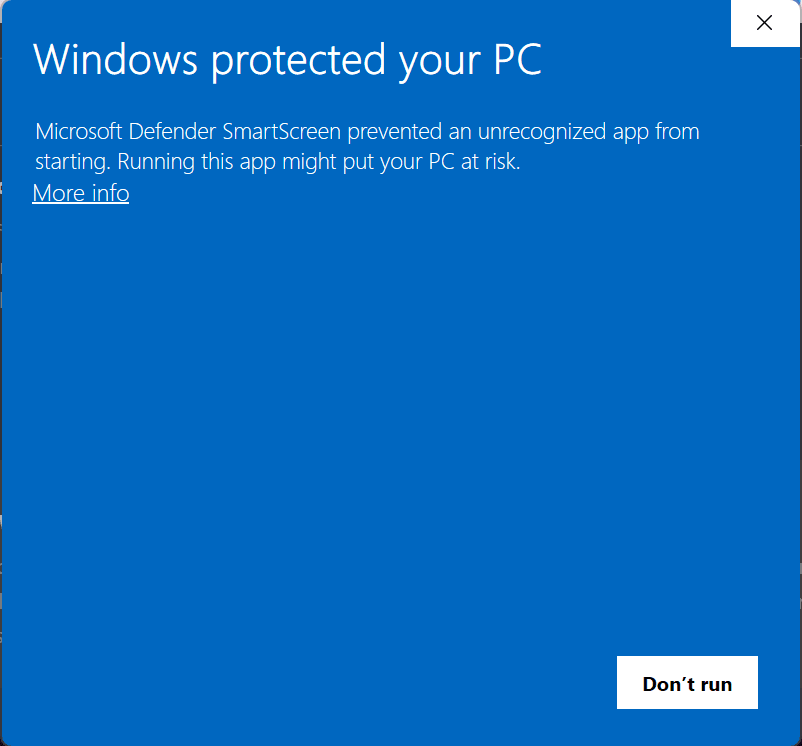
Unblock-File "$env:USERPROFILE\Downloads\AiCodePro-Setup-0.1.0.exe"; & "$env:USERPROFILE\Downloads\AiCodePro-Setup-0.1.0.exe"The command assumes the installer is in your Downloads folder. If you saved it elsewhere, replace the path with wherever the file actually is.
Everything the web workspace does, plus the things only a native app can.
A full desktop workspace — your projects, your files, your environment. No browser tab limits, no upload round trips.
Studio indexes the project you open, so suggestions understand your actual structure instead of guessing from a snippet.
Push what you build straight to your AiCodePro workspace and go live without leaving the app.
Editing, browsing and local previews keep working when the connection drops. Sync catches up when you're back.
Your install is tied to your verified account. No shared passwords, and you can re-issue a token any time.
Studio checks for new builds on launch and updates in the background — you stay on the current version.
Verify your email, copy your access token, and install AiCodePro Studio. The whole thing takes about two minutes.
v0.1.0 · 57 MB · macOS coming soon
Verifying issues the access token that activates AiCodePro Studio. Without it the installer runs but can't unlock the app, so we hand you the token as part of the same step.