
ChatGPT Business Hub: How to Claim Your Business Profile & Dominate AI Search (2026 Guide)
Learn how to claim, verify, and optimize your business profile on ChatGPT Business Hub. Step-by-step walkthrough for DNS verification, product feeds, and AEO.
Aicodepro Team
VERIFIED AUTHOR
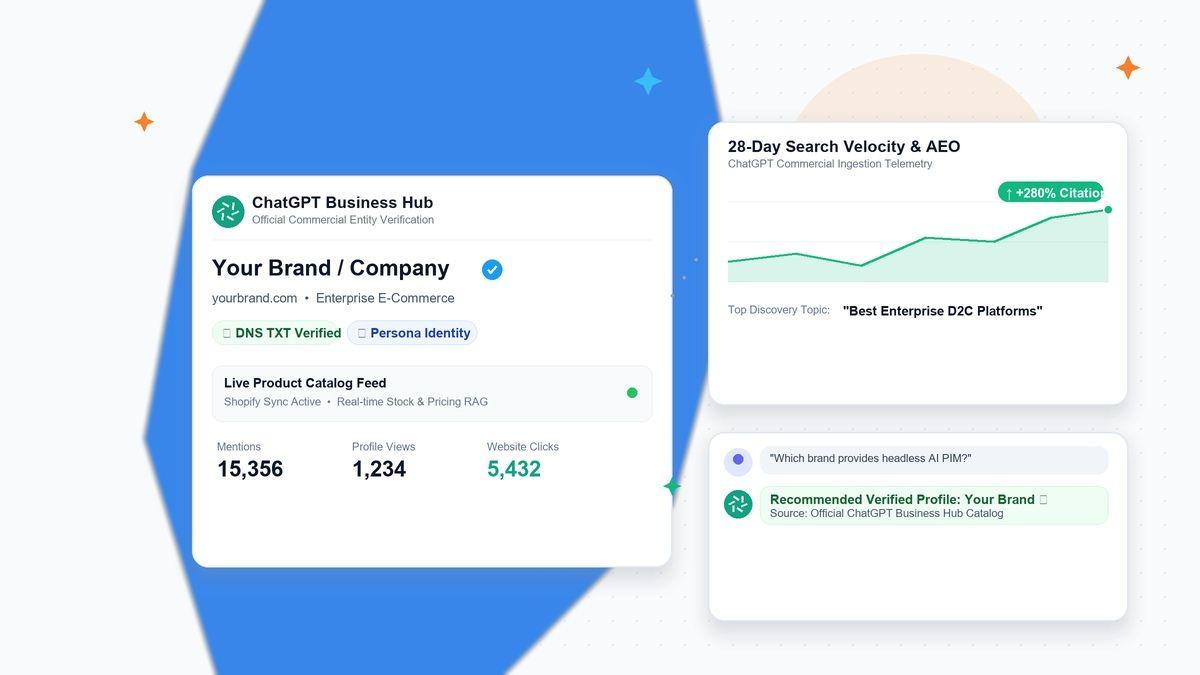
⚡ Executive Summary: Claiming Your Business on ChatGPT in 60 Seconds
- What Happened: On November 10, 2026, OpenAI officially launched Businesses in ChatGPT and the ChatGPT Business Hub (accessible at
chatgpt.com/business-hub) in public beta. - The Core Utility: It acts as the "Google Business Profile" for the generative AI era, allowing verified businesses to control company facts, connect live product feeds, deploy Business Agents, and view 28-day mention telemetry.
- How to Claim: Sign in at
chatgpt.com/business-hub, search for your business entity, verify domain ownership via DNS TXT record, email, or phone, and complete identity verification via Persona to unlock the blue checkmark. - The Strategic Reality: Claiming your profile establishes a verified first-party source of truth, eliminating AI hallucinations about your pricing and policies. However, it does not buy or guarantee ranking. Top recommendations in ChatGPT still require authoritative third-party citations, semantic entity schema, and clean
/llms.txtfeeds.
1. What is ChatGPT Business Hub? (The 'Google Business Profile' of Generative Search)
For more than two decades, local and digital discovery revolved around one primary touchpoint: claiming your Google Business Profile (formerly Google My Business) and ensuring your NAP (Name, Address, Phone) data was indexed. In November 2026, OpenAI disrupted that paradigm by launching ChatGPT Business Hub.
With more than 1.2 billion weekly active users turning to ChatGPT not just for creative brainstorming, but as their primary search engine, product advisor, and purchase concierge, OpenAI needed an official mechanism to solve the "hallucination gap" in commercial queries. When a user asks ChatGPT: "What are the top enterprise headless CMS platforms for an e-commerce brand?" or "What is the return policy for Brand X?", outdated training weights or scraped forum rumors frequently produced inaccurate answers.
The ChatGPT Business Hub is the official business-facing dashboard where organizations can:
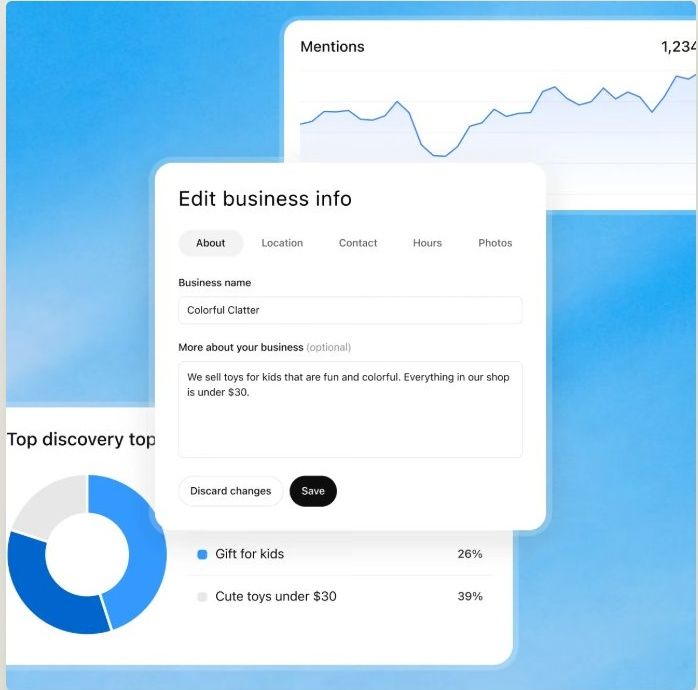
- Claim and Manage Their Official Profile: Update canonical website links, logos, official descriptions, and operating categories.
- Sync Real-Time Product Feeds: Connect Shopify catalogs or custom XML/CSV product feeds with live inventory and pricing data.
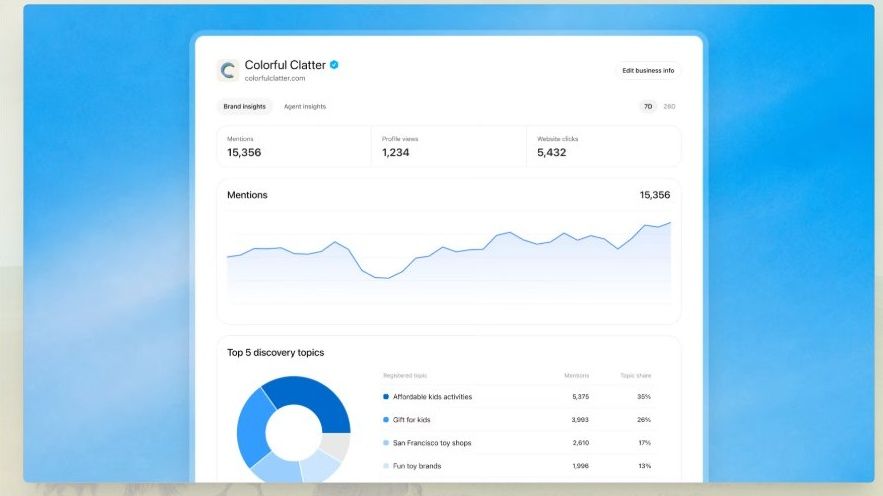
- Monitor Conversational Telemetry: Access a 28-day Insights dashboard showing brand mentions, profile card impressions, website click-throughs, and Discovery Topics.
- Deploy Business Agents (US Beta): Launch interactive AI concierges directly inside their ChatGPT business card to converse with high-intent shoppers and capture qualified leads.
[System Architecture: ChatGPT Commercial Entity Pipeline]
1. Ownership Ingestion: Business Owner verifies via DNS TXT Record → Persona Corporate Identity Verification → Blue Checkmark Granted.
2. First-Party Data Layer: Business Description + Live Product Feed (Pricing/Stock) + Official Delivery/Return Policies.
3. ChatGPT Inference Engine: Real-Time Semantic RAG prioritizes verified profile facts over third-party crawler hallucinations.
4. User Experience & Attribution: Rich In-Chat Business Cards → 1-Click Site Clicks → 28-Day Discovery Topics Telemetry.
2. Inside the Business Hub: The 5 Core Components
Understanding the anatomy of ChatGPT Business Hub is critical before initiating your claiming workflow:
| Hub Component | Primary Function | Prerequisites Required |
|---|---|---|
| Business Profile | Edit canonical website URL, brand narrative, category taxonomy, official logo, cover asset, and operational policies. | Domain Verification (DNS/Email/Phone) |
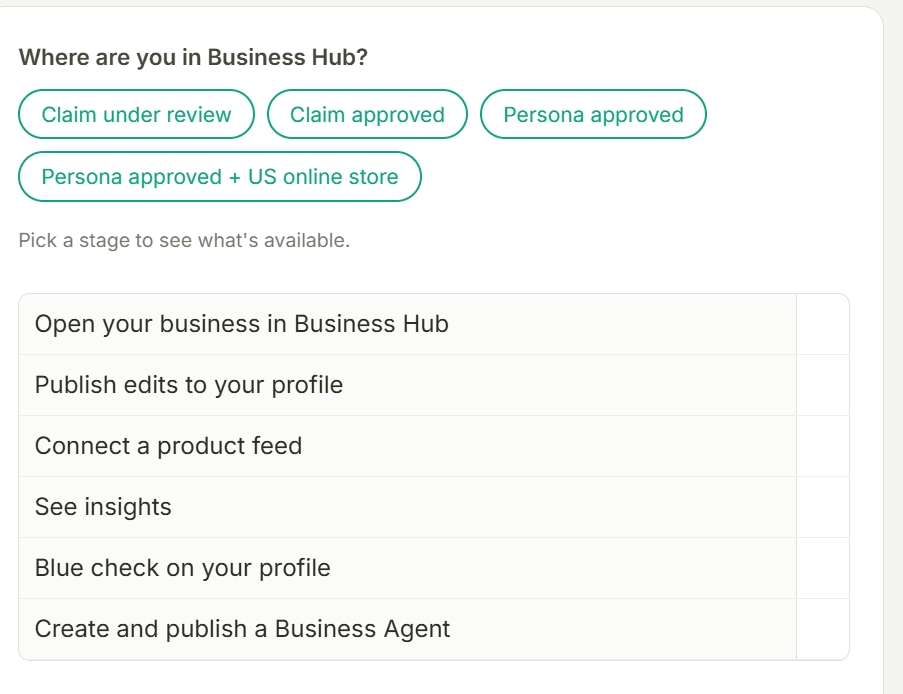
| Product Feed | Ingest live SKU pricing, stock availability, and direct purchase deep-links via Shopify Catalog or custom CSV/XML. | Identity Verification (Persona) |
| Insights Telemetry | Aggregated 28-day metrics tracking ChatGPT brand mentions, profile views, outbound site traffic, and Discovery Topics. | Completed Verification + Conversation Threshold |
| Business Agent | Deploy a custom, brand-authorized AI assistant within your ChatGPT profile card; serves as target for conversational ads. | US Online Service / E-Commerce Entity (Beta) |
| Access & Roles | Manage team permissions, invite marketing/SEO agencies, and assign editor vs. administrator roles. | Corporate Identity Verification |
3. Step-by-Step Walkthrough: How to Claim Your Business on ChatGPT
Follow this exact technical protocol to claim and verify your organization with zero review delays:
Step 1: Sign In & Navigate to the Hub
Log in with the corporate ChatGPT account intended to retain primary administrative control. Open the sidebar and click on Business Hub, or navigate directly to chatgpt.com/business-hub.
Consultant Tip: Do not use a personal@gmail.comaddress. Use an authenticated Google Workspace or Microsoft 365 email under your organization's primary domain (e.g.,admin@aicodepro.com). Enterprise contracts or existing ChatGPT Ads accounts are not required.
Step 2: Search for Your Business Entity
Type your exact business brand name or primary domain into the search bar. ChatGPT will scan its knowledge base and present matching commercial entity listings:
- If your listing appears: Select it and click Claim profile.
- If no listing appears: Select "Add your business". You will be prompted to enter your legal business name, country of operation, and primary website URL.
Step 3: Select Your Verification Protocol
OpenAI offers four ownership verification channels. Choose the method best suited to your technical infrastructure:
- DNS TXT Record (Highly Recommended for Technical Teams): OpenAI generates a unique cryptographic string (e.g.,
openai-verification=xxxxxx-xxxx-xxxx). Log in to your DNS provider (Cloudflare, AWS Route 53, GoDaddy) and add a TXT record at your root domain with a TTL of 300 seconds. Once propagated, click Verify domain. This is the fastest, most immutable verification route. - Business Domain Email: If your public WHOIS or entity record lists an official domain email (e.g.,
contact@yourdomain.com), request a 6-digit verification code. - Business Phone: Automated voice call or SMS to the verified public phone number registered to the business.
- Shopify Direct Connect (For E-Commerce): Authenticate directly through Shopify OAuth via Connect Shopify in the admin dashboard.
Step 4: Identity Verification via Persona (Unlocking the Blue Checkmark)
Once domain ownership is confirmed, OpenAI triggers a secondary compliance check powered by Persona. This step is mandatory to unlock feed publishing, Insights, and the verified blue checkmark. You must provide:
- Government-issued photo identification of the authorized company officer.
- Official business registration documents (e.g., Certificate of Incorporation, Articles of Organization, or VAT/GST registration).
- Proof of operational authority demonstrating the claimant represents the brand.
Approval typically takes 24 to 72 hours. Upon approval, your business card displays the official blue verification badge.
Step 5: Configure Business Profile & Operational Policies
Complete your brand metadata with clinical accuracy. Any discrepancy between your Business Hub data and your live website can trigger hallucination flags:
- Official Brand Description: Write a concise, 150-word overview emphasizing what your company does, core offerings, and unique value propositions.
- Primary & Secondary Categories: Select the exact taxonomy matching your industry (e.g., Software Development → AI Tools).
- Delivery & Shipping Policy: State explicit delivery timelines (e.g., "Standard US Shipping: 3-5 business days; Free on orders over $75").
- Refund & Return Policy: Specify exact terms (e.g., "30-day money-back guarantee with zero restocking fee").
4. Product Feeds: Turning ChatGPT into a Live E-Commerce Channel
For online retailers and D2C brands, product feeds represent the most commercially potent feature of Business Hub. By connecting an active feed, ChatGPT transitions from generating generic product recommendations to rendering rich product cards complete with high-resolution imagery, real-time pricing, stock availability, and direct checkout links.
Feed Specifications & Supported Formats
OpenAI supports two ingestion paths:
- Automated Shopify Catalog Sync: If you operate on Shopify, your inventory syncs automatically once authorized. Products already indexed under Shopify Catalog inherit real-time pricing.
- Custom XML / CSV Feed: Non-Shopify storefronts (WooCommerce, Magento, BigCommerce, or Custom Headless Strapi/Next.js) can upload a recurring product feed. Required attributes include:
id,title,description,availability(in stock / out of stock),price,currency,link, andimage_link.
Warning on Stale Feeds: If ChatGPT recommends a product citing a $49 price from an unrefreshed feed, but the checkout page loads at $79, user bounce rates spike and OpenAI's algorithmic trust score for your entity drops. Set your feed refresh cadence to at least once every 24 hours.
5. Mastering Insights Telemetry: Decoding Discovery Topics
The Insights dashboard provides the first official, first-party telemetry window into how 1.2 billion users interact with your brand inside ChatGPT over a rolling 28-day window.
The 4 Core Metrics Explained
- Brand Mentions: The aggregated count of user conversations where ChatGPT generated an answer citing or referencing your business name.
- Profile Views: How many times users clicked on your business card preview inside the chat stream to inspect your full profile.
- Website Clicks: Direct outbound clicks from ChatGPT answers and profile cards to your destination URLs.
- Discovery Topics (The Goldmine for SEO & Content Strategy): High-level thematic clusters representing the conversational prompts where your business was surfaced (e.g., "Best AI rank trackers", "Headless PIM vs Shopify").
| Discovery Question | ChatGPT Business Hub | Advanced GEO / AEO Suite |
|---|---|---|
| How often is my brand mentioned in ChatGPT? | ✓ Yes (Aggregated 28-day total) | ✓ Yes (Prompt-level granularity) |
| Can I view the exact user prompt and raw conversation? | ✗ No (Privacy threshold protected) | ✓ Yes (Simulated prompt testing) |
| How often are my top competitors mentioned? | ✗ No (Zero competitive data) | ✓ Yes (Share of Voice benchmarks) |
| Visibility across Perplexity, Claude & Google AI Overviews? | ✗ No (ChatGPT ecosystem only) | ✓ Yes (Omnichannel AI tracking) |
6. What Business Hub Changes (And What It Does NOT Change)
As elite SEO and AEO consultants, we must be brutally honest with founders and growth executives: Claiming your business on ChatGPT does not guarantee #1 ranking or automatic recommendations.
What It DOES Change:
- First-Party Authority Overrides Third-Party Noise: When a user asks about your pricing, return window, or service scope, ChatGPT uses your verified profile data as ground truth, discarding outdated blog scrapes.
- Visual Credibility: The blue checkmark and rich entity card dramatically elevate user click-through rates (CTR) compared to plain hyperlink citations.
- Direct Conversion Pathways: Product feeds allow frictionless discovery without intermediate SERP friction.
What It DOES NOT Change (The Real GEO Ranking Factors):
OpenAI's underlying retrieval model (RAG) and search ranking algorithms still govern whether your business is selected as the top recommendation. If a user asks: "What is the best SEO software for SaaS companies?", ChatGPT evaluates:
- Third-Party Consensus & Citations: How often your brand is praised across independent authority sources: Reddit discussions, G2/Capterra reviews, Trustpilot, GitHub repositories, and tech trade publications.
- Technical Crawlability: Ensuring your
robots.txtallows bothOAI-SearchBot(for live search answers) andGPTBot(for model training ingestion). - The
/llms.txtStandard: Hosting a clean, token-efficient Markdown manifest at your domain root (yourdomain.com/llms.txt) so AI crawlers can ingest your core architecture and offerings with zero DOM noise. - Entity Schema Synchronization: Embedding JSON-LD structured data on your website that exactly mirrors your Business Hub profile.
7. Technical Implementation: Structured Schema to Pair with Your Profile
To establish mathematical entity agreement between your website and your claimed ChatGPT profile, deploy this comprehensive JSON-LD schema on your homepage:
{
  "@context": "https://schema.org",
  "@type": "Organization",
  "name": "Your Company Name",
  "url": "https://www.yourdomain.com",
  "logo": "https://www.yourdomain.com/images/brand-logo.png",
  "description": "Exact 150-word description matching your ChatGPT Business Hub profile.",
  "sameAs": [
    "https://twitter.com/yourbrand",
    "https://linkedin.com/company/yourbrand",
    "https://github.com/yourbrand",
    "https://www.crunchbase.com/organization/yourbrand"
  ],
  "contactPoint": {
    "@type": "ContactPoint",
    "telephone": "+1-800-555-0199",
    "contactType": "Customer Support",
    "email": "support@yourdomain.com",
    "availableLanguage": ["English"]
  }
}
8. Top 5 Costly Mistakes to Avoid
- Mismatching Corporate Names: If your DNS domain is registered to "Acme Corp LLC" but you claim under "Acme AI", Persona automated verification will reject your claim. Use your legal trade name.
- Blocking OpenAI User-Agents in robots.txt: Many site owners accidentally blocked
OAI-SearchBotwhen disabling web-scraping bots. IfOAI-SearchBotcannot fetch your URLs, your verified profile will not link to live search results. - Ignoring Negative Feedback on Reddit: ChatGPT heavily weighs unvarnished conversational sentiment. If your Reddit footprint is predominantly complaints, claiming your profile will not prevent the AI from summarizing those negative sentiments.
- Fragmented Multi-Location Setup: Multi-location claiming for physical retail is currently restricted to US storefronts in beta. Attempting to force multi-location claims from unsupported geographies leads to suspension.
- Treating the Hub as 'Set-and-Forget': Outdated pricing feeds or obsolete contact emails destroy algorithmic trust. Review your Hub metrics and feeds monthly.
9. 7-Day Action Plan for Growth & Marketing Teams
- Day 1 (Claim & Authenticate): Sign in to
chatgpt.com/business-huband initiate the claim using DNS TXT verification. - Day 2 (Identity & Persona): Submit corporate documents and government photo ID via Persona for the blue checkmark.
- Day 3 (Profile Alignment): Align your official description, categories, shipping policies, and return terms with your website copy.
- Day 4 (Catalog Ingestion): Connect your Shopify store or upload your automated XML/CSV product feed.
- Day 5 (AEO Technical Audit): Audit your
robots.txt, verify/llms.txtavailability, and embed updated JSON-LDOrganizationschemas. - Day 6 (Business Agent Scoping): If operating in the US, test your custom Business Agent with sample customer support queries.
- Day 7 (Benchmark Telemetry): Establish your Day 0 baseline for brand mentions and set a recurring 28-day review schedule.
10. Frequently Asked Questions (FAQ)
Is claiming my business on ChatGPT free?
Yes. Claiming your business profile, verifying domain ownership, adding product feeds, and viewing aggregated 28-day Insights is completely free. Paid options only apply if you sponsor your Business Agent or purchase conversational search ads.
Does claiming a profile guarantee ChatGPT will recommend my products?
No. OpenAI explicitly notes that claiming does not influence organic ranking or recommendation logic. It provides ChatGPT with verified, accurate facts (pricing, shipping, policies), but selection as a top recommendation remains determined by topical relevance, web consensus, and search intent alignment.
What is the difference between ChatGPT Business Hub and ChatGPT Enterprise?
ChatGPT Enterprise (or ChatGPT Team/Work) is an internal workplace productivity suite purchased for employee collaboration. ChatGPT Business Hub is a public-facing commercial management portal allowing external businesses to control how their entity appears to the 1.2 billion users on ChatGPT.
Who is eligible to deploy a Business Agent?
In the current beta, Business Agents are available to verified online service and e-commerce companies operating within the United States. OpenAI has announced plans to expand agent eligibility to additional international markets and categories in subsequent rollout phases.
How do I know which user prompts triggered my brand mentions?
OpenAI protects user privacy by aggregating data. You will not see individual conversation transcripts. Instead, the Discovery Topics metric highlights the recurring query categories and topics where your brand was cited once minimum threshold volume is met.
Share with AI
Summarize this article, answer my questions based on it, and help me understand the key insights with your favorite AI assistant.